
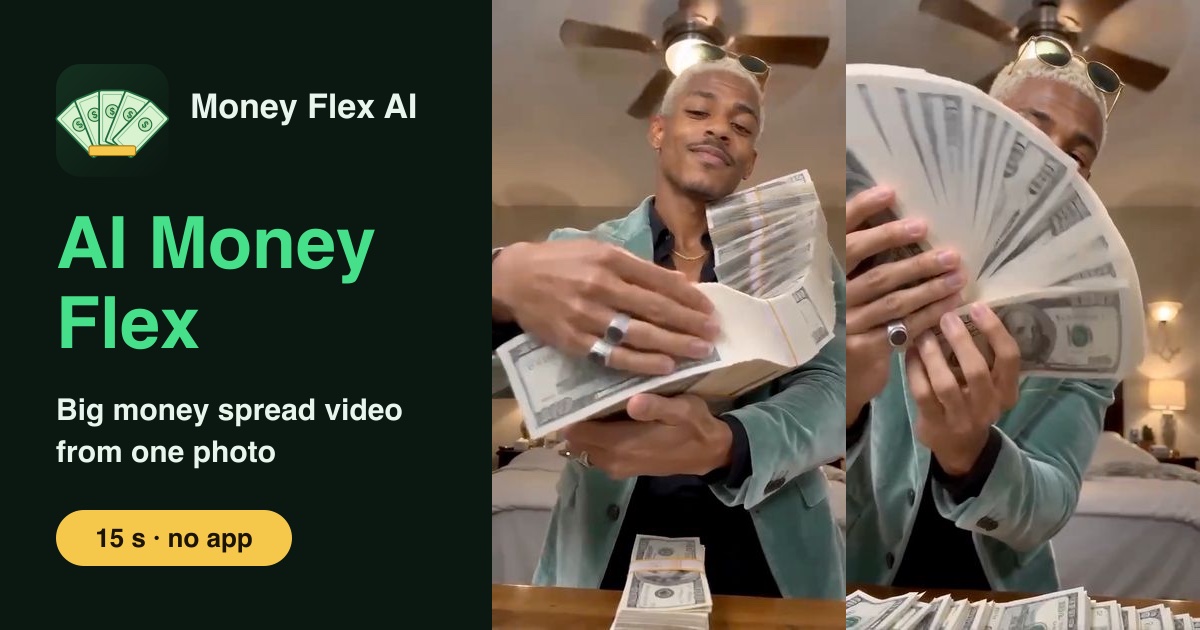
To make a money spread video without CapCut, upload one clear photo of one person on Money Flex AI, pay once ($4.99 per video) and download a 15-second, vertical 9:16, silent MP4 of that person hugging, swinging, throwing and fanning a chain of cash, usually in about 5 minutes. It runs in the browser: no CapCut, no app, no account and no editing. The cash in the video is AI-generated fake money, for fun only.
What you need
- One photo of one person, face clearly visible. A half-body or full-body shot keeps the outfit best; a selfie works. JPG, PNG, WebP or iPhone HEIC, at least 300 pixels on each side.
- The right to use it. A photo of yourself or of someone who agreed. No celebrities, no group photos, no pets.
- An email address for checkout. The link to your video is sent there.
- Apple Pay, Google Pay or a card.
Step 1: Choose the photo
The AI uses your photo for the person's face, hairstyle and clothes. The bedroom, the desk and the cash are generated, so the background of your photo does not matter.
- Face the camera or close to it, eyes visible, no sunglasses.
- Daylight or a bright room; avoid heavy beauty filters.
- Wear the outfit you want to see in the video.
More examples are in the best photos for an AI money flex.
Step 2: Upload and pay
Open the home page, tap the button, add your photo and confirm you have the right to use it. Then pay for one video on the secure checkout page. You pay once per video, with no subscription and no sign-up. After paying you return to the page and the video starts on its own.
Step 3: Download and post
The video is usually ready in about 5 minutes. You can close the page: the address you used at checkout gets an email with a private link to the video.
What you get is one continuous 15-second shot from a phone propped low on a desk in a bedroom with a ceiling fan. The person hugs a long chain of banded $100-bill bricks and sweeps a hand across it, swings it over a shoulder, whips it past the lens so bills land on the desk, rips the band off one stack and fans the bills in front of their face. No text is added to the frame.
Then:
- Open TikTok, Instagram Reels or YouTube Shorts and upload the MP4.
- Add a sound in the app. The video is silent on purpose; see what sound to use.
- Add your caption, for example "all my money is cash", and post.
Settings at a glance
| Money Flex AI | |
|---|---|
| App needed | No, it works in the browser |
| Input | One photo, one person, face visible |
| Output | One MP4: 15 seconds, vertical 9:16, 720p, no sound |
| Model | Seedance 2.0 Mini by ByteDance (a third-party AI video model) |
| Time | Usually about 5 minutes |
| Price | $4.99 per video, pay once |
| If it fails | Credits come back automatically; make it again at no extra cost |
Other ways to do it without CapCut
You can also try a general AI image-to-video tool: one that accepts a photo and can make a 15-second, vertical 9:16 clip. In that case you describe the scene yourself, in a simple line such as "a person in a bedroom shows off stacks of fake cash and fans the bills". Expect some trade-offs:
- You usually need an account and often a subscription or credit pack.
- The moves rarely come out in the right order on the first try, so plan for several attempts.
- Some tools cap clips at shorter lengths or use a different shape, which then needs cropping.
If you want the trend's exact five moves without writing or retrying anything, the generator on our home page is built for that one shot. A neutral comparison of the options is in AI money flex alternatives.
If something goes wrong
- "This photo is too small." Use the original photo, not a screenshot or a cropped copy.
- The face does not look quite like you. Try a sharper, front-facing photo with even light.
- The video failed. Its credits come back automatically, so you can make it again at no extra cost.
FAQ
Can I make the money spread video without any app?
Yes. Money Flex AI runs in the browser on your phone or computer. You upload a photo, pay and download the MP4.
Is the money in the video real?
No. It is AI-generated fake money. The video is a joke for entertainment only and does not show real money.
How long does it take?
Usually about 5 minutes. The video link is also emailed to the address you used at checkout.
Do I need to write a prompt?
No. The five moves are built into the effect; you only upload a photo.
Does it include music?
No. The video is silent and we do not provide any audio. Add a sound in TikTok, Reels or Shorts when you post.
AI Money Flex guides
- AI Money Flex Video: What It Is and How to Make One (2026)
- Big Money Spread AI: Make the Video from One Photo (2026)
- All My Money Is Cash Trend: Meaning and How to Join (2026)
- Super Money AI Filter: Not a Camera Filter, an AI Video (2026)
- Is There a Free AI Money Flex Generator? Honest Answer (2026)
- Best Photos for an AI Money Flex Video: What Works (2026)
- What Is the Money Spread Trend? Meaning and Moves (2026)
- What Sound to Use for the AI Money Flex Trend (2026)
- AI Money Flex Alternatives: 3 Ways to Make It Compared (2026)